Learn a new little challenge
How to play Wordpaths
Draw words from dots to rings. Weave the paths around one another until every letter has a place.
The goal: use every letter
Wordpaths is a word puzzle about finding a complete cover. A word can look promising on its own and still leave a corner you cannot reach. Your job is to make all the paths work together.
- Start on a filled circle. The filled markers are the beginnings of your words.
- Draw through neighboring letters. Move up, down, left or right. Diagonal moves do not count.
- Finish on an open ring. Words need at least three letters and must be accepted by the game’s word list. Rings are not paired with particular starts.
- Cover the whole board. Paths cannot cross, share a letter, or pass through another start or ring. Every letter must belong to a word.
A route is not just a word list: the positions matter. Two words that need the same cell cannot both remain on the board.
Read the teaching board
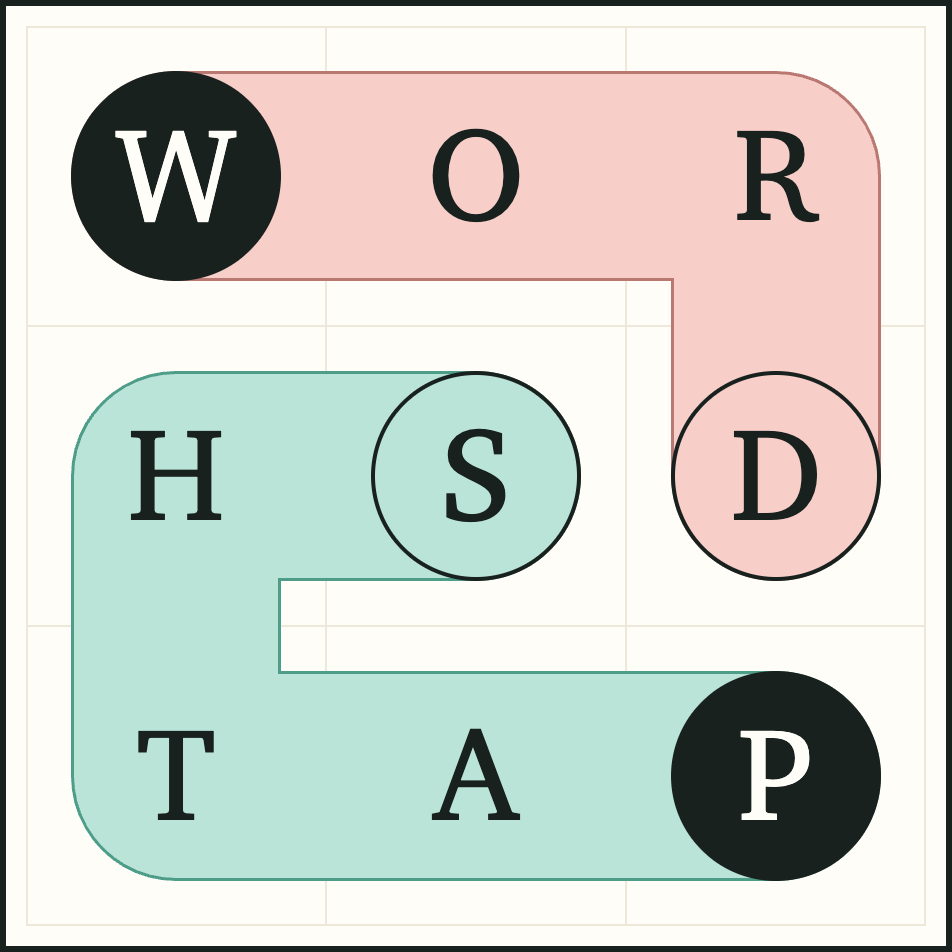
The first route spells WORD across the top and down the right side. The second starts at P in the bottom-right corner, travels left through A and T, then up through H and right to S. Together they use all nine cells.
Notice that each route begins at a filled circle and ends at a ring. They bend through neighboring cells without touching the same letter cell. The example is small enough to follow in one glance; a larger daily board asks you to coordinate more routes.
Make a path, then revise it
Drag from a filled circle through the letters of a word. Drag back along your path to shorten it. You can tap a finished path to change or clear it, so finding one word does not have to settle the whole puzzle.
Use Clear to remove the selected editable route, or Undo to step back through a change. Restart clears the board’s routes, including hinted routes; hints already taken still count. Check the confirmation before starting over.
With a keyboard, focus a cell and use Enter or Space to select it. Arrow keys extend the selected path, Backspace shortens it and Escape deselects. Keep the board focused while using these controls.
What to try when a route gets stuck
- Check the endpoints. You need a filled circle at the start and an open ring at the finish, rather than an arbitrary pair of letters.
- Look at the leftover space. An unused letter tucked between finished paths may need a different route through the board.
- Reconsider an early word. A valid word is one part of the cover, not proof that the rest will fit.
- Change one route at a time. Shorten or clear it, then see whether the new space helps a neighboring word.
A short route can be useful if it leaves enough room for the others. A longer route can help if it reaches letters that would otherwise be isolated. Neither is a rule that guarantees a solution.
Daily boards and saved progress
New 5×5, 6×6 and 7×7 boards arrive daily at 5 a.m. New York time. Use the size chooser to try another board. Your browser saves your progress locally; playing in another browser does not automatically bring that run with you.
If a board does not load, check your connection and use the game’s retry action. Avoid clearing site data if you want to keep locally saved progress. The Wordpaths privacy policy explains the browser’s storage and support options.
Ready to trace your own way through?
Play WordpathsPrefer arranging pieces? Read the Wordclips guide. For falling letters, try Wordchute’s rules. You can also compare all three games.