Learn a new little challenge
How to play Wordclips
Fit letter pairs into four-letter words. Use the theme and the pinned pair to make the whole board click.
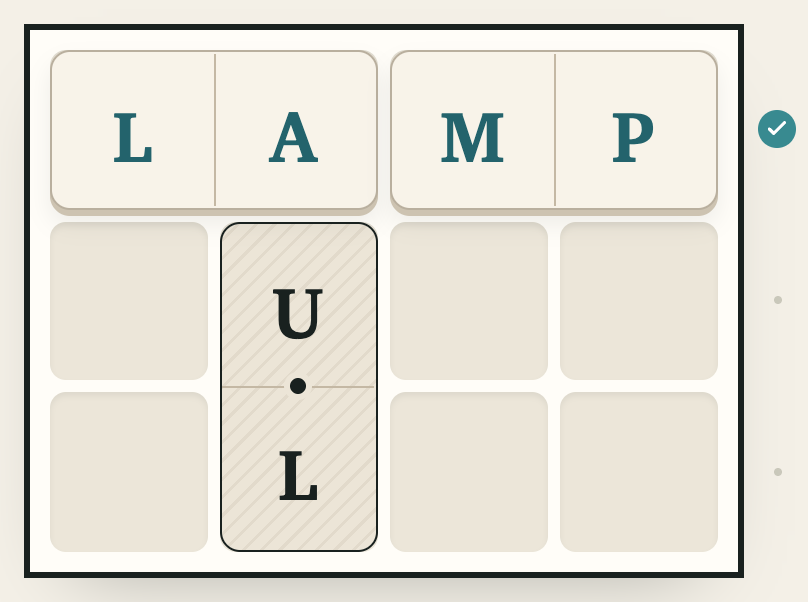
The goal: a word in every row
Wordclips gives you letter dominoes: pieces carrying two letters each. Fit them into the board so that every row reads as an accepted four-letter word from left to right. You must fill the board with the pieces; a valid word in one row is a good start, not the finish.
- Read the theme and pinned pair. One piece is fixed in place. Its letters and the theme are clues to the words you might build.
- Choose a pair. Tap a piece in the tray. Its marked letter tells you which end you are positioning.
- Rotate or place it. Tap the selected pair again to rotate it, or use Rotate. Tap a board square for the marked letter, or drag the pair into position.
- Fill every row. A pair can sit across a row or extend vertically between rows. Each complete row must spell a valid word.
The letters travel together. You can rotate a piece, but you cannot split it into two independent tiles, overlap another piece, or move the pinned clue.
What the LAMP example shows
In the picture, the top row reads L–A–M–P. The left pair is turned so its letters read L then A; the right pair supplies M then P. The valid-word check confirms that row. The pinned piece lower down stays in place while you work on the rest.
The same idea becomes more interesting when a piece stands vertically. One of its letters may finish a word in one row while its other letter has to work in the next. Judge the fit on both rows before treating the placement as settled.
The theme helps you think of possible words. The game accepts a full board of valid words even if you find a different fill from the intended themed set; a valid solve does not depend on reproducing one exact physical arrangement.
Changing a placement
Select a placed pair to pick it up and try another position. Use Rotate to change its orientation, To tray to send the selected pair back to the tray, or Undo to step back. The pinned pair remains fixed.
Restart returns the movable pairs to the tray and clears that board’s Undo history. It leaves the pinned clue in place. A solution reveal arranges the pieces into one themed solution and marks the puzzle Revealed; it is help rather than an unassisted solve.
With a keyboard, Tab to a piece and press Enter or Space. Arrow keys move between board cells; Enter places the selected piece. R rotates, Delete returns a piece, Escape clears selection and Ctrl/⌘ Z undoes.
When a row will not come together
- Use the pinned letters as an anchor. Think of words that could include them in their actual positions.
- Inspect the pair’s other letter. A placement that helps one row can make the neighboring row harder.
- Try a rotation. The same two letters may fit in the opposite order or work vertically.
- Read the finished row left to right. A row can be full without spelling an accepted word. A check marks a valid row; revisit a completed row that is not accepted.
You do not have to commit to the first theme word you think of. Moving a pair out of a nearly finished row can make room for a better overall fit.
Daily puzzles, originals and progress
Quick and Challenge boards offer two daily puzzles. New pairs arrive at 5 a.m. New York time. Open All boards to choose a released date or the original themed puzzles. The originals are useful places to learn the controls without looking at answers to today’s boards.
This guide describes browser play. Your progress and preferences stay in that browser. A browser’s storage being cleared can remove its saved runs. Read Wordclips privacy and support for the storage details, or ask for help if something is not working.
Make your first pair click
Play WordclipsPrefer drawing words? Read the Wordpaths guide. For planning falling letters, try Wordchute’s strategy examples. Or choose between all three games.